100 Days of Code day 7

Seasoned Professional and recent IT and Web Development Graduate with a deep passion for coding and a drive to accomplish objectives, looking to transition into a career within the Tech industry. Eager to solve problems and relentless in efforts to find solutions. Extensive experience in improving the performance, productivity, efficiency, and profitability of organizational operations. Continually exceeds expectations by building strong relationships and works well with people at all levels of the organization, including stakeholders, customers, vendors, and team members.
I decided to start my day at the computer tackling these error messages I'm receiving from React.
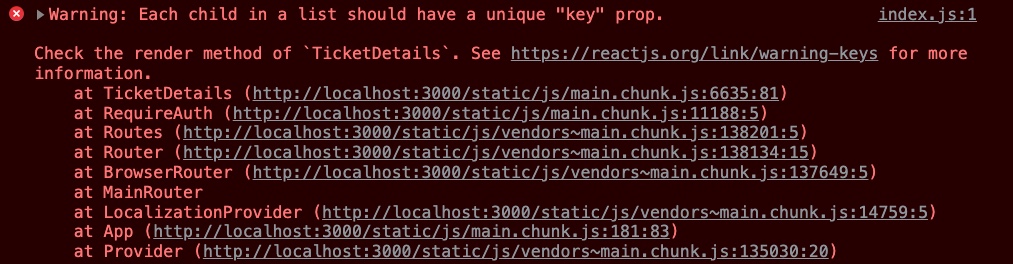
Whenever you're rendering an array of React elements, each one must have a unique key prop. I was having issues with displaying a divider with each comment, so I enclosed the content in a react fragment and gave it a key (comment.id).
              {comments.map((comment) => (
                <Fragment key={comment._id}>
                  <Typography
                    sx={{
                      backgroundColor: 'lightblue',
                      padding: '10px',
                      borderRadius: '10px',
                      mt: 1,
                    }}
                  >
                    <div key={comment._id}>
                      {comment.commenter.firstName} {comment.commenter.lastName}{' '}
                      posted on{' '}
                      {moment(comment.createdAt).format('MMMM Do, YYYY')}
                    </div>
                    <div>{comment.comment}</div>
                  </Typography>
                  <Divider sx={{ mt: 1 }} />
                </Fragment>
              ))}
Next warning
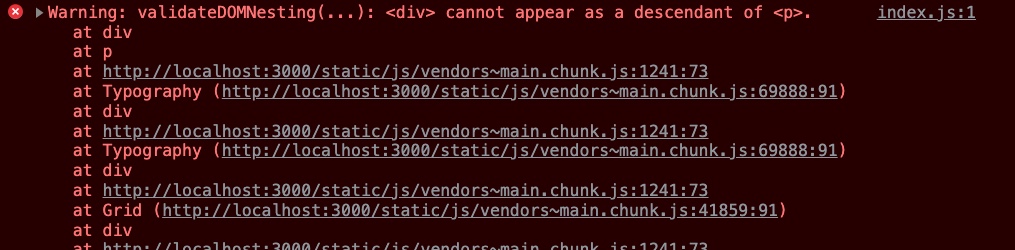
I believe by default, when you use a Typography element that MUI offers it is a
element. Defining the Typography as a "div" component, I seemed to have fixed the issue. <Typography
component="div"
sx={{
backgroundColor: 'lightblue',
padding: '10px',
borderRadius: '10px',
mt: 1,
}}
After fixing the above errors with my application, I spent about an hour reviewing the code that I had written in several components. Then I made another call to the backend to get data about the ticket shown in the browser. Feel free to check out my progress here. It is valentine's day, so I better run to the store and get my flowers and something special for dinner. "Happy wife happy life" - it's a real thing.


